javascript动态创建可拖动、最大化、最小化的层
用Javascript实现p层的拖动是很常见的一种操作,比如弹出提示对话框,快捷登录等等。之前用隐藏层的方式实现了p层的弹出操作,仅仅用到了js修改style的display属性。现在,需要弹出许多可以拖动的窗口,这些窗口之前并不存在于dom,而是根据用户点击动态创建的,于是需要写一个js的类,用于实现p层的动态弹出,而且具有最大化、最小化、关闭等操作。效果如下图:
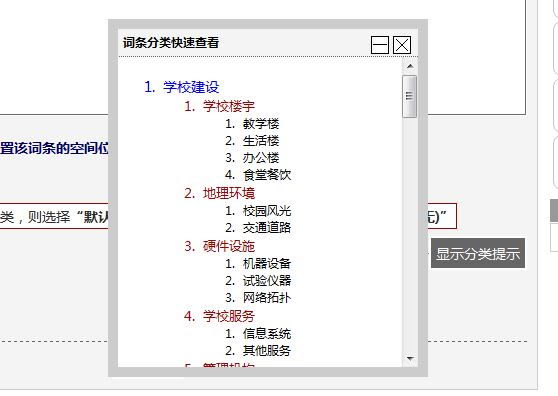
(一个打开的窗口)

(最小化窗口)
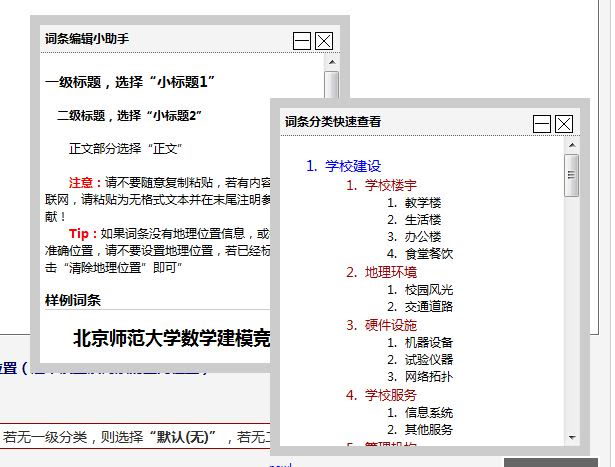
(打开两个窗口)
js类的实现方式如下
// JScript source code
var Dialog = function () {
    var options = arguments[0] || {};
    this.title = options.title || "新窗口";
    this.width = options.width || 400;
    this.height = options.height || 300;
    this.html = options.html || "";
    this.left = options.left || document.documentElement.scrollLeft + document.documentElement.clientWidth / 2 - this.width / 2;
    this.top = options.top || document.documentElement.scrollTop + document.documentElement.clientHeight / 2 - this.height / 2;
    this.container = document.createElement("p");
    this.head = document.createElement("p");
    this.content = document.createElement("p");
    this.dialogclose = document.createElement("span");
    this.dialogmin = document.createElement("span");
    this.dialogmax = document.createElement("span");
    this.init();
};

Dialog.prototype = {
    init: function () {
        var me = this, container = me.container, head = me.head, content = me.content, dminw = me.dialogmin, dclose = me.dialogclose, dmaxw = me.dialogmax, left = me.left, top = me.top;
        title = me.title, width = me.width, height = me.height, html = me.html;
        container.appendChild(head);
        container.appendChild(content);
        container.style.fontFamily = "微软雅黑";
        container.style.width = width + "px";
        container.style.height = "auto";
        container.style.border = "solid 10px #CCC";
        container.style.zIndex = "100";
        container.style.background = "#FFF";
        container.style.position = "absolute";
        container.style.left = left + "px";
        container.style.top = top + "px";
        document.body.appendChild(container);
        head.style.background = "#F4F4F4";
        head.style.padding = content.style.padding = "5px";
        head.style.borderBottom = "dotted 1px #666";
        head.style.cursor = "move";
        head.style.width = me.width - 10 + "px";
        dminw.onclick = function () { me.miniw(me); };
        dminw.innerHTML = "最小化";
        dmaxw.onclick = function () { me.maxw(me); };
        dmaxw.innerHTML = "最大化";
        dmaxw.style.display = "none";
        dclose.onclick = function () { me.hide(me); };
        dclose.innerHTML = "关闭";
        head.innerHTML = title;
        head.appendChild(dclose);
        head.appendChild(dmaxw);
        head.appendChild(dminw);
        content.style.height = height + "px";
        content.style.overflow = "scroll";
        content.style.overflowX = "hidden";
        content.style.
        content.innerHTML = html;
        head.onmousedown = function (e) {
            e = e || window.event;
            container.posX = e.clientX - container.offsetLeft;
            container.posY = e.clientY - container.offsetTop;
            document.onmousemove = function (e) {
                me.drag(e, me);
            };
            document.onmouseup = function () {
                document.onmousemove = null;
                document.onmouseup = null;
            };
        };
    },
    drag: function (e, me) {
        e = e || window.event;
        var o = me.container;
        o.style.left = (((e.clientX - o.posX) >= 0) ? e.clientX - o.posX : 0) + "px";
        o.style.top = (((e.clientY - o.posY) >= 0) ? e.clientY - o.posY : 0) + "px";
    },
    show: function (me) {
        var o = me.container;
        o.style.display = "block";
    },
    hide: function (me) {
        var o = me.container;
        o.style.display = "none";
    },
    miniw: function (me) {
        var o = me.container;
        me.content.style.display = "none";
        me.dialogmax.style.display = "inline";
        me.dialogmin.style.display = "none";
        o.style.height = me.head.style.height;
        me.head.style.borderBottom = "";
    },
    maxw: function (me) {
        var o = me.container;
        me.content.style.display = "block";
        me.dialogmin.style.display = "inline";
        me.dialogmax.style.display = "none";
        o.style.height = "auto";
        me.head.style.borderBottom = "dotted 1px #666";
    }
};
调用方法很简单,如下:
var CatalogDialog = new Dialog({ width: 300, height: 300, title: "这里是标题" });
CatalogDialog.content.innerHTML = "×××"; //这里设置窗口内容
CatalogDialog.hide(); //关闭
CatalogDialog.show(); //显示
CatalogDialog.miniw(); //最小化
CatalogDialog.maxw();//最大化
留言 3